What's New in FeedWatch?
This page lists new features, enhancements, and bug fixes in the latest FeedWatch (on premise) desktop application and FeedWatch Touch Scale Application releases. Expand the sections below to learn more!

FeedWatch (on-premise) Desktop Application - Version 10.15.5
Release Date: July 14, 2026
FeedWatch (on-premise) version 10.15.5 contains the following updates:
- Complete feeding schedules: The Feeding Schedule's "Current" view now displays all scheduled feedings for every pen in your daily plan.
- Accurate ingredient adjustments: Fixed an issue where increasing dry matter percentages caused manual overrides to drop or disappear.
- Stable schedule saving: Fixed a crash that occurred when saving changes to afternoon or evening feeding periods.

FeedWatch Touch Scale Application - Version 10.15.5
Release Date: July 14, 2026
FeedWatchTouch Scale version 10.15.5 contains the following update:
- Reliable Wi-Fi connections: We improved communication in the app to prevent system lockups and eliminate the need to restart the app.

FeedWatch in PULSE
Release Date: December 15, 2022
FeedWatch in PULSE contains the following enhancement:
Check out the latest improvement to Bunk Scoring in PULSE! You can now use a keyboard to enter values for Pen Counts and Target DM/HD on the Bunk Scoring page.
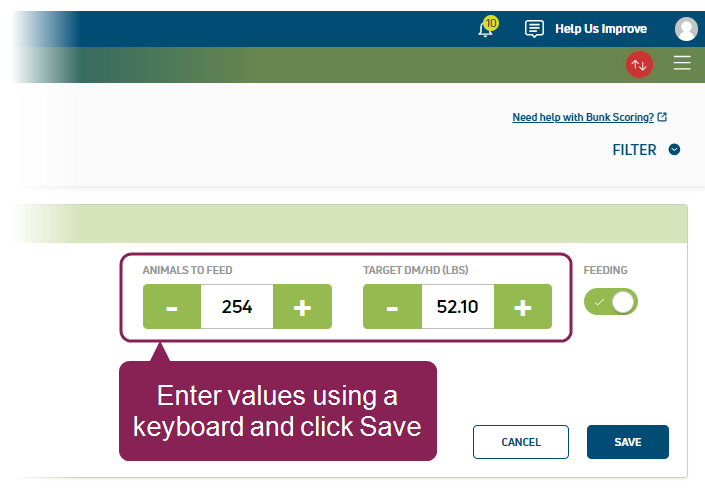
Previously, you could only increase or decrease the Pen Counts and Target DM/HD values by clicking the +/- buttons.
FeedWatch (on-premise) Desktop Application - Version 10.15.2
Release Date: June 3, 2025
FeedWatch (on-premise) version 10.15.2 contains the following bug fixes:
- Duplicate location fix: We resolved an issue where FeedWatch would create a duplicate location for an ingredient and change the DM% to 0 for both locations. This would prevent deliveries or changes to the ingredient.
- Emailed reports fix: We resolved an issue affecting reports sent by email.
FeedWatch Touch Scale Application - Version 10.15.1
Release Date: March 10, 2025
FeedWatch Touch Scale version 10.15.1 contains the following bug fix:
- Removed a premix setting that sometimes caused freezing issues: We removed a premix setting that sometimes locked up FeedWatch. All other premix settings work correctly.
FeedWatch (on-premise) Desktop Application - Version 10.15.1
Release Date: March 10, 2025
FeedWatch (on-premise) version 10.15.1 contains various bug fixes:
- Removed a premix setting that sometimes caused freezing issues: We removed a premix setting that sometimes locked up FeedWatch (on-premise). All other premix settings work correctly.
- Fixed an issue where drop data was duplicated: We resolved an issue where drops were incorrectly duplicated when using a WiFi connection. The data is now transferred correctly.
FeedWatch (on-premise) Desktop Application - Version 10.12.6
Release Date: October 10, 2023
- Reduced the time it takes for FeedWatch (on-premise) to load a new tab.
- Fixed an issue where scheduled email reports weren't sent correctly.
- Upgraded the communication with our backup server to ensure that FeedWatch (on-premise) has a more reliable connection.
FeedWatch (on-premise) Desktop Application - Version 10.12.2
Release Date: July 5, 2023
- Upgraded the latest release of FeedWatch (on-premise) to improve the system's compatibility with Animal Health International (AHI) interfaces.
- Fixed an issue where the system could crash if you tried to view same-day data on the history screen.
- Corrected issues that affected FeedWatch (on-premise) language settings.
- Upgraded the FeedWatch (on-premise) engine to ensure better performance.
Several bugs were squashed in this update. For a detailed list, please contact the VAS Feed Support Team at [email protected].
FeedWatch (on-premise) Desktop Application - Version 10.11.2
Build Date: January 3, 2023
Release Date: January 3, 2023
- Inventory-related enhancements were implemented in this update. For a detailed list, please contact the VAS Feed Support Team at [email protected].
- Inventory-related bugs were squashed in this update. For a detailed list, please contact the VAS Feed Support Team at [email protected].
FeedWatch (on-premise) Desktop Application - Version 10.14
Release Date: November 7, 2024
FeedWatch (on-premise) version 10.14 contains various improvements and bug fixes:
- Updated two reports to correctly display data for metric system users: The following reports now show the correct data for metric system users: Ingredient Usage by Pen Type with Cost and Ingredient Usage by Pen Type with Cost by Day. Previously, the reports did not correctly show the costs due to a conversion issue. This issue did not affect imperial system users.
- FeedWatch (on-premise) (64-bit) is now compatible with the Microbatcher Interface: If you use a Microbatcher Interface, you can now use the latest FeedWatch (on-premise) release to run your microbatcher system.
- Improved FeedWatch (on-premise) speed: FeedWatch (on-premise) no longer freezes or slows down when you navigate to different tabs.
- Fixed two reports that weren't showing data correctly: The Graph Drop Times and Graph First Feeding Time reports now show data correctly.
FeedWatch Touch Scale Application - Version 10.11.4
Build Date: March 27, 2023
Release Date: March 27, 2023
In FeedWatch Touch Scale version 10.11.4, we squashed some bugs and improved the logic related between FeedWatch Touch Scale and FeedWatch (on-premise) to improve data integrity. This fix was also implemented in the following FeedWatch Touch Scale releases:
- 10.10.5
- 10.6.5
- 10.2.4
- 9.12.3
- 7.6.193
For a detailed list, please contact the VAS Feed Support Team at [email protected].
FeedWatch (on-premise) Desktop Application - Version 10.13.1
Release Date: February 19, 2024
FeedWatch (on-premise) version 10.13.1 contains various improvements and bug fixes:
- Recipes tab now shows inventory totals: When you build a recipe using the Recipe Wizard, FeedWatch (on-premise) now displays the total amount of dry matter (DM) and as-fed (AF) feed.
- New warning message for recipe deletion: The system now displays a warning message if you attempt to delete a premix recipe if the premix is used in another recipe.
- Improved the speed of the task scheduler: We cleaned up the task scheduler so it now works faster than ever!
Several bugs were squashed in this update. For a detailed list, please contact the VAS Feed Support Team at [email protected].
FeedWatch Touch Scale Application - Version 10.11.4
Build Date: March 27, 2023
Release Date: March 27, 2023
In FeedWatch Touch Scale version 10.11.4, we squashed some bugs and improved the logic related between FeedWatch Touch Scale and FeedWatch (on-premise) to improve data integrity. This fix was also implemented in the following FeedWatch Touch Scale releases:
- 10.10.5
- 10.6.5
- 10.2.4
- 9.12.3
- 7.6.193
For a detailed list, please contact the VAS Feed Support Team at [email protected].
FeedWatch Touch Scale Application- Version 10.4.6
Build Date: 03/06/21
Release Date: 03/31/21
- Scale feeding adjustments to balance feedings – FW-3949: The correct feeding amounts were not calculated when a feeding adjustment was made at the FeedWatch Touch Scale app that added feed to a balance feeding that was previously zeroed out. This issue has been fixed.
FeedWatch Touch Scale Application- Version 10.3.12
Build Date: 02/24/21
Release Date: 03/01/21
- WiFi communication – FW‑4979: The following enhancements were made to setups that use WiFi communication:
- Additional information is now captured in the Touch App WiFi network logs.
- Improved the connect/disconnect process on the WiFi adapter.
- Requests to the FeedWatch (on-premise) server now occur only when the configured adapter is connected to the network.
- Data is now sent and received in a single packet. This enhancement avoids issues with data being sent to and from the Touch App.
- Data is now stored on the tablet if the device is not configured in the FeedWatch (on-premise) desktop application. Once the device is properly configured, the data will be processed by the service. This ensures that data is not lost when a device is not configured.
- WiFi communication – FW-4979, FW-5040: The following fixes were made to setups that use WiFi communication:
- The Touch App can now accept data from a FeedWatch (on-premise) computer using the DD/MM/YYYY date format via WiFi communication.
- A crash issue was fixed that occurred when the WiFi adapter was not configured or not found. Now, a message will be sent to the user stating that the adapter is not connected.
- When the tablet uses more than one WiFi adapter:
- The WiFi connection status icon now shows the correct connection status.
- The configured adapter will now be used.
FeedWatch (on-premise) Desktop Application- Version 10.3.27
Build Date: 02/24/21
Release Date: 03/01/21
- WiFi communication – FW‑4979: The following enhancements were made to setups that use WiFi communication:
- Data is now sent and received in a single packet. This enhancement avoids issues with data being sent to and from the FeedWatch (on-premise) server.
- Data is now stored on the tablet if the device is not configured in the FeedWatch (on-premise) desktop application. Once the device is properly configured, the data will be processed by the service. This ensures that data is not lost when a device is not configured.
- WiFi communication – FW-5040: The FeedWatch (on-premise) computer using the DD/MM/YY date format can now send data to the Touch App via WiFi.
FeedWatch (on-premise) Desktop Application- Version 10.3.23
Build Date: 01/13/21
Release Date: 01/22/21
- WiFi wireless communication now available in FeedWatch (on-premise): FeedWatch (on-premise) now offers a new way for the desktop application to communicate with the tablet at the mixer. This can be accomplished by using the dairy’s own WiFi network infrastructure. Get data to and from the mixer even faster using WiFi. WiFi communication will provide up to 8 times faster data transfer speed when compared to using RF modems. Save time and money using your WiFi network with FeedWatch (on-premise)!
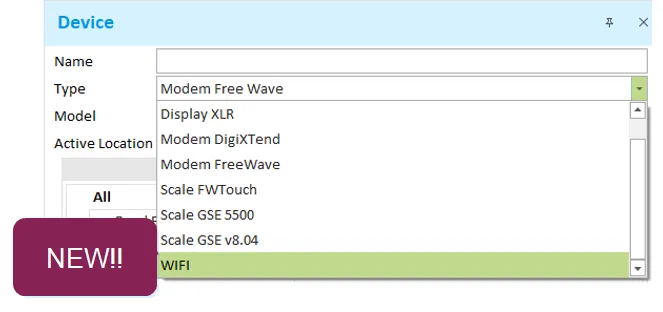
- New device type – FW‑4490: To help support the new WiFi communication method, a new device type was added. This helps to make it quick and easy to set up a mixer with WiFi communication.
- Feeding target changes now update secondary mixers – FW-3944: When feeding target changes are made on a mixer, those changes now update the feeding schedule of all other mixers. This fix was only needed for the pen daily adjustment method.
- Current cost columns – FW-4921: Fixed an issue where the current cost columns were appearing as blank on the Ingredients > Locations panel.
- App crash on the History screen – FW-4923: Resolved an issue where the application would occasionally crash when working in the History screen.
FeedWatch Touch Scale Application- Version 10.3.9
Build Date: 01/07/21
Release Date: 01/22/21
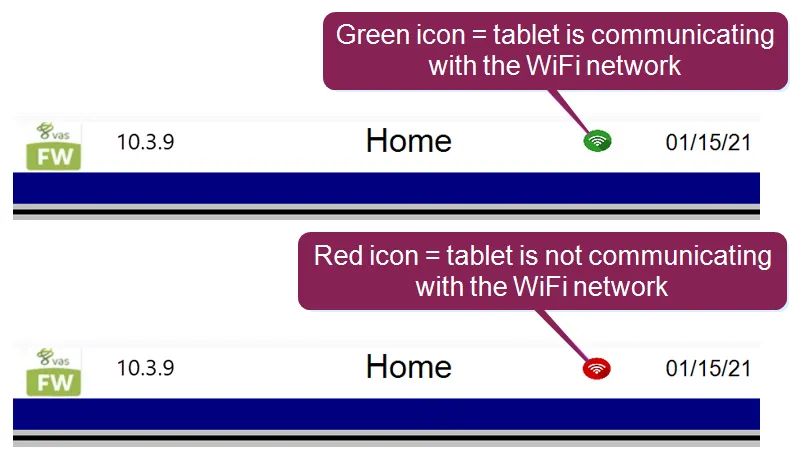
- WiFi wireless communication now available in FeedWatch (on-premise): FeedWatch (on-premise) now offers a new way for the desktop application to communicate with the tablet at the mixer. This can be accomplished by using the dairy’s own WiFi network infrastructure. Get data to and from the mixer even faster using WiFi. WiFi communication will provide up to 8 times faster data transfer speed when compared to using RF modems. Save time and money using your WiFi network with FeedWatch (on-premise)!
- WiFi connection status – FW‑4650: To help support the new WiFi communication method, we added a WiFi status indicator. This icon will show the feeder if the tablet is currently connected to the farm’s WiFi network. Now it’s super simple to check connection status—just go to the Home page and check the icon status.