DC on Mobile Release v1.14.9359 - June 2026
DC on Mobile v1.14.9359 includes the following enhancements:
- Streamlined event entry: Optimized consecutive event entry to reduce repetitive actions and increase speed when performing back-to-back events.
- Seamless dairy switching: Improved flexibility for multi-dairy users by allowing you to switch dairies or log out without needing to restart the application.
- Enhanced search navigation: Refined search behavior with a new auto-clear feature, which reduces manual cleanup and makes it faster to find what you need.
- System stability and performance improvements: Resolved 24 bugs across iOS and Android, including UI defects and crashes related to Turbo Modules, Realm, and Bluetooth, to ensure a more predictable and dependable experience.
DC on Mobile Release v1.13 - April 2026
DC on Mobile v1.13 includes the following enhancements and bug fixes:
- Improved calf ID validation for FRESH events:
- The app checks calf IDs to make sure they are not already in use.
- Calf IDs can only include periods or commas if the dairy is set as a Source Farm.
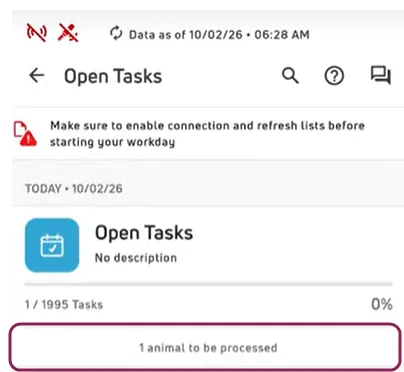
MYDC ONLY View animal counts in Open Tasks list when offline: The app now shows how many animals with tasks were completed while offline:
DC on Mobile Release v1.12 - February 2026
DC on Mobile v1.12 includes the following enhancements and bug fixes:
- New playback sounds added to hospital worklists: The following sounds have been added to make it easier to quickly check and manage the animals on your hospital worklist:
- "Bo-Bip": Plays when you scan an animal and open the CowCard.
- "Treatment Date Future": Plays when the event date is after today.
- "Test for Residue": Plays if an animal is past the last day of treatment and their MKDAT is today.
- "Evaluate and Hold": Plays if an animal is past the last day of treatment and their MKDAT is after today.
- "Ready for Beef": Plays if an animal is past the last day of treatment, their BFDAT is today, and their MKDAT is prior to today.
- Multiple TRANSFER event enhancements:
- Since embryos are commonly bought in batches with identical parentage and lab details, you can now copy TRANSFER event details and apply them to several animals at once. This saves time and ensures your records are accurate. See Copy Event Details to learn more.
- When you add a TRANSFER event on the app, you can now enter information for Embryo Owner, Lab ID, and Lab Embryo ID.
- Source farm number display order is now fully supported: The app now recognizes and includes dots in source farm IDs (i.e., 12.3456 with 12 being the source farm identifier).
- Improved animal search for service sires: When you search for a service sire, the app now displays results for any matching sire ID, regardless of type (NAAB
 Code, Name, or Registration Number). Previously, the app only displayed results for the preferred sire ID type.
- iOS devices now support BLE scanning technology: iOS devices can now scan tags using scanners with BLE technology.
- Optimization and performance enhancements: This version includes a significant technology upgrade to improve performance, reliability, and stability across the entire app.
- Fixed an issue where some unprocessed, local transactions were erased, but not removed from the Transaction log.
- You can now save alphanumeric values for Item Type #31 and #33 items (i.e., NDPRS1, NDPRS2, RESP, USDA, VISID, etc.).
- When you view protocols in a hospital worklist, remark details are now fully shown.
- The app now displays the correct fresh and frozen embryo inventory counts.
- Resolved several cosmetic issues including inconsistent column widths, overlapping buttons, and headers that weren't fully visible.
DC on Mobile Release v1.11 - November 2025
DC on Mobile v1.11 includes the following enhancements and bug fixes:
-
NEW FEATURE Offline editing for CowCard items: You can now Edit Items from a CowCardEdit Items from a CowCard while in offline mode. Any changes you make will automatically be processed when you are back online. See Online & Offline ModeOnline & Offline Mode (v2) to learn more.
-
NEW FEATURE Copy event details to multiple animals: You can now copy event details and apply them to several animals at once. This option is helpful when you're entering the same event—like a vaccination or treatment—for multiple animals. It saves time and helps ensure your records are accurate. See Copy Event DetailsCopy Event Details to learn more.
-
ENHANCEMENT CowCard item updates are now logged: The Transaction LogTransaction Log (v2) now records any updates you make when using the Edit Items button in the CowCard.
- Custom sounds now play properly for tasks when an RFID scanner is connected.
- All vaccine options configured for VACC event REM definitions are now available on the Events screen when entering VACC events.
- Previous breedings now display properly when tapping the CDAT field for a PREV event in online mode.
DC on Mobile Release v1.10 - October 2025
DC on Mobile v1.10 is now available, and includes the following enhancements and bug fixes:
- Edit items from a CowCard: You can now use the Edit Items button to update select items (online mode only). See Edit Items from a CowCardEdit Items from a CowCard to learn more about working with items from the CowCards and to see a full list of items you can edit from DC on Mobile.
- CowCard tab improvements: We updated our CowCard tabs by replacing text labels with clean, intuitive icons to make navigation simpler. The icons from left to right are:
-
 Tasks
Tasks
-
 Items
Items
-
 Events
-
 Testdays
-
 Lactations
- Embryo TRANSFER events are now correctly recorded in PULSE when entered from DC on Mobile.
DC on Mobile Release v1.9.7528 - July 2025
DC on Mobile v1.9.7528 includes a hot fix for customers who cannot open their dairies after refreshing their herd data and downloading the previous version of DC on Mobile, v1.9. Download the latest version of DC on Mobile, v1.9.7528, to avoid this issue.
DC on Mobile Release v1.9 - July 2025
DC on Mobile v1.9 is now available! We continued to focus on bug fixes and performance improvements in this release, including resolving some major issues from previous releases:
- Vet Lists improvements: You can now delete events directly from a and we improved the visibility of the reason for a vet check (VETC) in the vet list screen. See Vet ListsVet Lists to learn more about checking or treating animals on a .
- CowCard tab improvements: You can now view more details in the Events tab and the Tests tab, as well as use the new View Dates button in the Lacts tab to check the dates of your animal's latest lactations! See Manage Animals (v2)Manage Animals (v2) to learn more about working with CowCards in DC on Mobile.
Several bugs were squashed in this update. For a detailed list, please Contact UsContact Us.
DC on Mobile Release v1.8 - June 2025
DC on Mobile v1.8 is now available! We continued to focus on bug fixes and performance improvements in this release, and we also added the following new enhancements:
- MyDC customers spoke and VAS listened! Making sure newborn calves receive a high-quality colostrum or replacer is one of the most critical activities that support the long-term health and well-being of your herd. We added the COLOSTRUM event to make capturing and tracking your colostrum activities easier and more consistent. See COLOSTRUM Event (MyDC only)COLOSTRUM Event (MyDC only) to learn more!
- You can now add custom tasks directly from the CowCard's Tasks tab! See Manage Animals (v2)Manage Animals (v2) to learn more!
Several bugs were squashed in this update. For a detailed list, please Contact UsContact Us.
DC on Mobile Release v1.7 - October 2024
DC on Mobile v1.7 is now available! We continued to focus on RFID scanner performance in this release, and we expanded the following enhancements and improvements:
- RFID scanning is now even faster! See RFID ScannersRFID Scanners (v2) to learn more about using scanners.
- The new Transaction Log feature now includes search, filter, and sort options to help you quickly find transactions you've completed in the past 14 days. See Transaction LogTransaction Log (v2) to learn more!
- When you scan an animal in a pen, the SCPEN ID is also included in the Transaction Log. This provides a handy visual cue while monitoring the changes for a specific pen.
Several bugs were squashed in this update. For a detailed list, please Contact UsContact Us.
DC on Mobile Release v1.6 - September 2024
We continued to focus on feature parity with the original version of the app (v1), and also included the following enhancements and improvements:
- DC on Mobile now keeps track of some user actions. A new Transaction Log feature is now available on the More menu! Use this feature to view a list of transactions you've complete in the app over the last 14 days. See Transaction LogTransaction Log (v2) to get started!
- A new My Account feature was added to the More menu. Use this new feature to update how often DC on Mobile requests your PIN when logging in to the app. See My AccountMy Account to learn more!
- We continued to improve RFID scanner performance in this release and also included an RFID option when adding an event. See RFID Scanners (v2)RFID Scanners (v2) to learn more about working with scanners!
- Worklists in DC on Mobile now support the new task types in PULSE, and you now have the ability to view and mark these new task types as done.
- When a tag assigned to an animal is scanned on the Events tab, DC on Mobile now adds the animal to the event.
- Several bugs were squashed in this update. For a detailed list, please Contact UsContact Us.
DC on Mobile Release v1.5 - June 2024
DC on Mobile v1.5 is now available to our beta testers! We are continuing to focus on feature parity with the original version of the app, as well as the following enhancements and improvements:
- We've improved RFID scanner performance and added the RFID option to the Tasks tab. See RFID Scanners (v2)RFID Scanners (v2) to learn more about working with scanners!
- The app now includes an online help link. See DC on MobileDC on Mobile to check it out!
- The ABORT event now includes validation for the date and only displays the Lactation CycleLactation Cycle field if the animal is eligible to start a new lactation cycle.
- Open Tasks sounds are now enabled to make processing your lists quicker and more intuitive.
- The app now supports adding a Donor that is not in the herd.
- CowCard data from PULSE now automatically updates when your device is online.
- The app now uses a standard event EDAY value: the local dairy time at midnight in UTC.
- Worklist updates sent to PULSE now include the Pen ID.
- The app also includes improved localization for Brazilian Portuguese, transaction log enhancements, and other requested improvements. We've also resolved multiple functionality issues.
- When adding FRESH events, if CBRD (calf breed) is included in the list of items to prompt for CALF, the value will not be accepted. As a workaround, do not include CBRD in your Items to be Prompted for New CalvesItems to be Prompted for New Calves. You can then add CBRD from web by opening the calf from the Animals ListAnimals List and editing its details.
 movement logging to ensure moving an animal to a new pen is labeled accurately in the transaction log.