Activate SomaDetect Integration
2 min
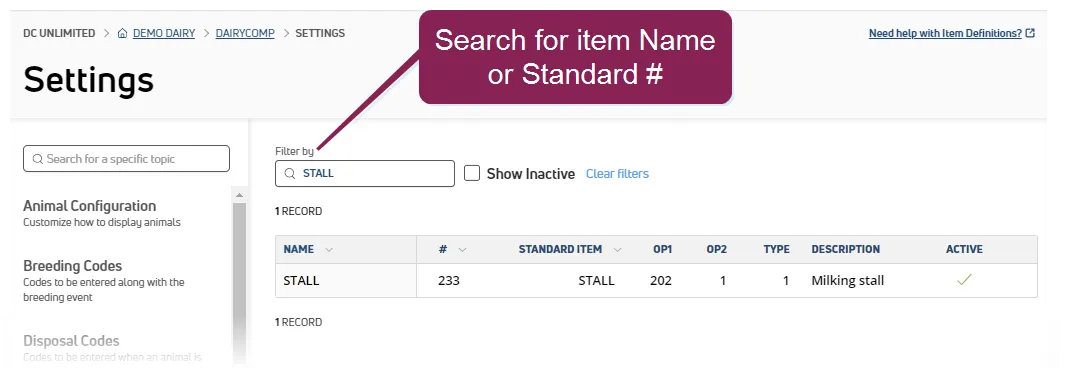
required permissions only users who are assigned a role with integrations management permissions can connect partner integrations see edit dairy user permissions docid\ gwf5x nqu chbcmzo3 be and manage dairy roles docid\ iarw cydtgnug6lkpcbuk for more information somadetect's one directional integration with pulse allows for bulk vas animal data, including stall location, test day details, and diagnosis events, to be shared with somadetect's system follow these steps to activate the integration with somadetect step 1 connect integration in pulse in pulse, navigate to partners > integrations gallery > somadetect click see details or see requirements on the somadetect integration card follow the connection instructions on the right side of the page to establish the connection click the connection status toggle and verify the status switches to active click save if necessary, click edit integration to make any adjustments or edits and save your changes important if your integration does not automatically connect, contact your somadetect representative to connect the integration from their system step 2 check standard items in pulse, select dairycomp/mydc > settings > item definitions from the menu bar docid\ ezfejzdkbcfov b69aupr use the filter by field to search for each of the required items by name or standard # to verify they exist in your dairy item name item description standard # durat duration of the last milking 2023 stall stall last milked in 2022 start start time of the last milking 2024 if necessary, add or update your items in pulse or dairycomp 305 important use caution when adding or updating item details standard #s can only be assigned once from pulse