Activate Förster-Technik Integration
2 min
Prior to being able to activate your Förster-Technik integration, the following are required:
- Förster-Technik feeding and scale equipment installed at your facility.
- An existing Calf Cloud account and API key. Contact Förster-Technik to inquire about an account, or go to https://www2.calf-cloud.com to verify your account status. The API key is accessible from your Calf Cloud General Profile page, in the API release section. Click Start release to show the key.
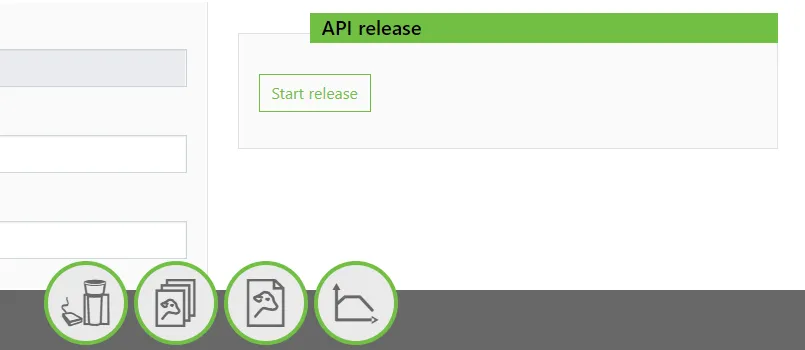
Once your equipment and Calf Cloud account are confirmed, follow these steps to activate the integration and present data on the CowCard Partners tab in PULSE:
- In PULSE, navigate to Partners > Integrations Gallery > Förster-Technik.
- Click See Details or See Requirements on the Förster-Technik integration card.
- Follow the Connection Instructions on the right side of the page to establish the connection:
- Enter your API key:
- Click the edit icon
 and paste your API key into the field that opens.
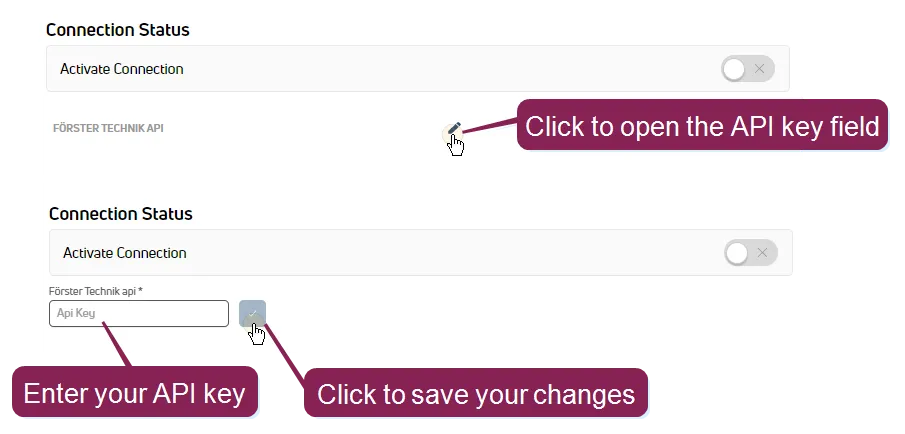
- Click the blue button
 to save the API key.
- Click the Connection Status toggle and verify the status switches to Active.
- Click Save.
- If necessary, click Edit Integration to make any adjustments or edits and save your changes.
IMPORTANT: If your integration does not automatically connect, contact your Förster-Technik representative to connect the integration from their system. If requested, provide your Dairy Id and Herdcode listed on the Förster-Technik Integration Gallery details page.
Once activated, the widgets are automatically added to the CowCard Partners tab.