Micro Technologies Cubex Inventory Widget Details
The Micro Technologies Cubex Inventory widget includes key VAS animal events, such as diagnoses and treatment protocols, as well as drug supply and usage information from Cubex. View the example below for more information on the data shown in the widget.
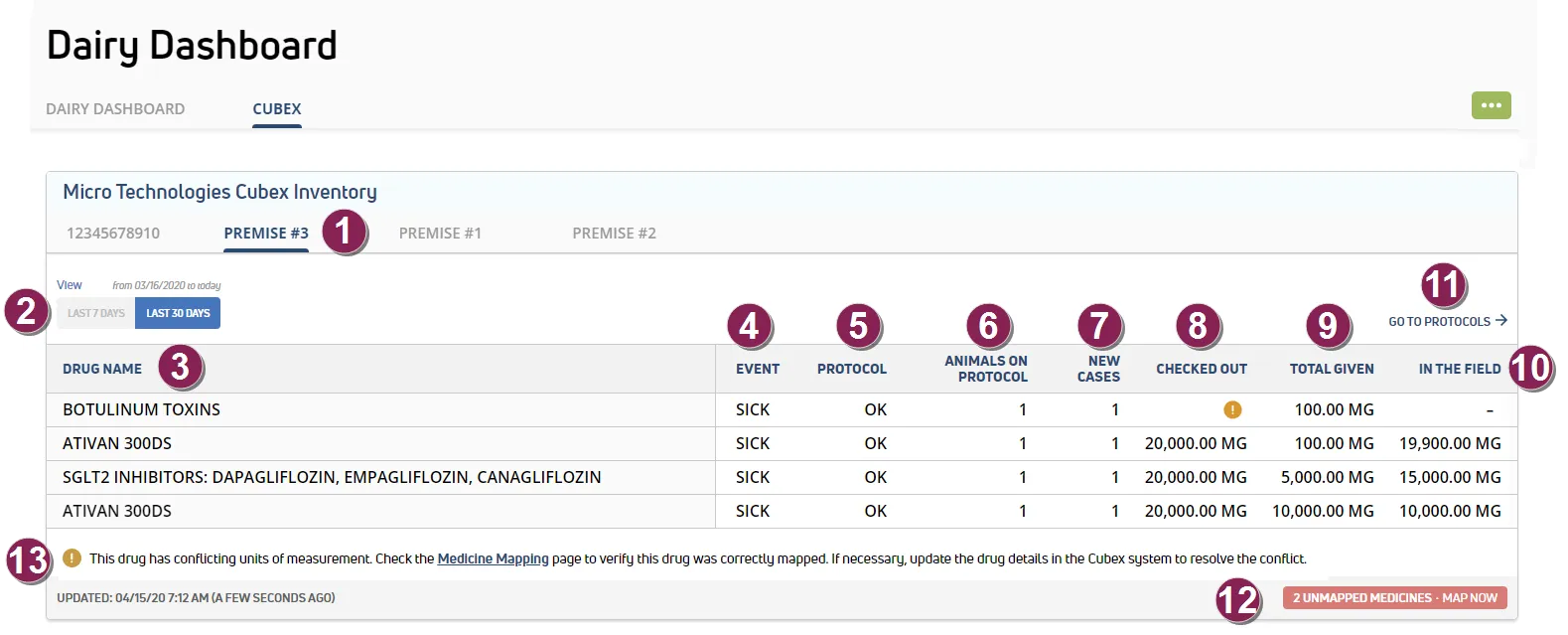
Premise Tab: If your dairy has multiple Cubex instances installed, each site displays on its own tab with the Premise Alias name. For more information on editing the alias, see Medicine Mapping.
View: Choose to view widget data for the last 7 or 30 days.
Drug Name: Medicine name from Cubex.
Event: DairyComp 305 Event name. See Event Definitions for a complete list of Events for your dairy.
Protocol: DairyComp 305 Protocol name. See Protocols (MyDC Only) for a complete list of Protocols for your dairy.
Animals on Protocol: Total number of animals on the treatment protocol for the selected date range.
New Cases: Total number of new cases diagnosed in the selected date range.
Checked Out: Amount of medicine checked out from Cubex inventory.
Total Given: Total amount of medicine used to treat animals recorded during DairyComp 305 event entry.
In the Field: Amount of medicine checked out from inventory, minus the total given.
Protocols Link: Follow this link to view Protocols (MyDC Only) for your dairy.
Unmapped Medicines: If any medicines from the Cubex inventory are not mapped to a CowCare drug, a message displays here to notify you that a mapping is required. Click the link to access the Medicine Mapping page.
Unit Conflict: A message displays here if unit of measurement conflicts are detected. This occurs if multiple Cubex medicines are mapped to a single CowCare medicine and the units of measurement do not match between the mapped Cubex drugs. For example, if one Cubex medicine is measured in milliliters and another is measured in grams, a conflict would result. When a unit conflict exists, the In the Field amount cannot be calculated, and the value displays as a dash (-).