Print and Export WeighComp Data
1 min
You can print and save your transaction and harvest load data for your records or future reference. Follow these steps to print or export your data:
- Go to the WeighComp page with the data you want to print or export.
- For transaction data, go to the Transaction ManagementTransaction Management page.
- For harvest data, go to the Harvest ManagementHarvest Management page and click on a harvest to view its details. Then click on the tab with the data you want to view (Overview, Pending Loads, or Approved Loads).
- If necessary, filter the on-screen results to show the data you want to print or export.
- Click the Options
 button and choose a print or export option.
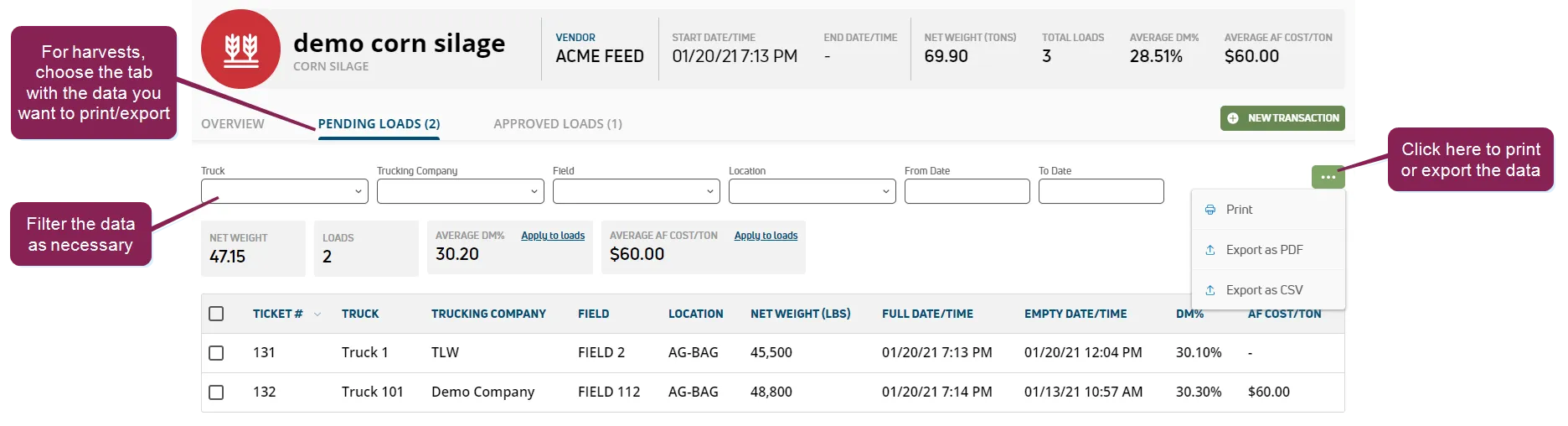
- Print (to a printer configured for your computer)
- Export as PDF
- Export as CSV
Export options create a file on your computer that can then be opened using an appropriate application