O que há de novo no FeedComp?
Confira os recursos e melhorias mais recentes no FeedComp.
FeedComp Versão v1.4.3474 - Maio 2026
Melhorias
-
APENAS MOBILEEdite quantidades de fornecimento diretamente na página de Lotes: Para ajudar você a chegar mais rápido com menos toques, as quantidades de fornecimento (AF e DM/HD) agora podem ser editadas inline ao tocar em Editar Lote. Você pode atualizar um ou mais fornecimentos de uma vez, e o DM/HD Alvo é recalculado automaticamente para refletir suas mudanças. Isso funciona tanto online quanto offline.
-
APENAS MOBILEO teclado não cobre mais os campos de entrada em certos dispositivos: Corrigimos um problema em dispositivos iPhone e Android específicos onde a tela não rolava para cima ao editar campos no final de uma lista (ingredientes, receitas, fornecimentos, lotes de batch). O app agora foca corretamente no campo selecionado em todas as telas e tipos de dispositivos suportados.
- Manipulação otimizada de MS/HD: Fizemos várias melhorias nos bastidores sobre como os valores de MS/HD são calculados, sincronizados e reconciliados para que as metas de epen e as quantidades de alimentação permaneçam consistentes entre fluxos de trabalho online e offline. Essas otimizações também abordam casos especiais relacionados a alternativas de receitas, alimentações divididas e resolução de conflitos durante a sincronização offline.
A equipe do FeedComp está trabalhando duro para trazer novas funcionalidades e melhorias, mas algumas atualizações podem não estar totalmente prontas ou suportadas ainda. Revise a lista de dicas, problemas conhecidos e soluções alternativas para o FeedComp:
⚠️ Problema conhecido: A sincronização offline pode causar cargas ausentes ou incompletas no relatório de Histórico de Alimentação Atualmente estamos investigando um problema em que alimentações concluídas no Modo Offline podem não aparecer imediatamente nos relatórios web para a data atual após a sincronização, mesmo que apareçam corretamente no histórico do dia anterior.
- O que isso significa para você: Se você sincronizar um dispositivo e o relatório de hoje ainda mostrar uma carga como "Ausente" ou "Incompleta", verifique o Histórico de Alimentação do dia anterior para confirmar que os dados foram recebidos.
- Status: Nossa equipe de engenharia está trabalhando em uma correção para garantir que os relatórios sejam atualizados corretamente em todas as datas, independentemente de quando a sincronização ocorre.
Outros Problemas conhecidos
- Use o mode online para garantir que os dados sejam sincronizados e salvos corretamente: Sempre que possível, use o modo online no FeedComp App ao criar ou editar ingredientes ou receitas.
- Use fluxos de trabalho padrão para garantir o melhor desempenho: Para garantir que a versão atual do FeedComp funcione corretamente, evite misturar unidades, editar durante a alimentação ou trocar de dispositivo no meio de uma tarefa.
- Mantenha o app aberto durante as alimentações: Para a melhor experiência, mantenha o aplicativo aberto durante as alimentações para garantir que os processos não sejam interrompidos e tudo funcione sem problemas.
- Sincronize seus dados se alimentações concluídas ainda estiverem marcadas como incompletas: Certifique-se de sincronizar os dados do app antes de completar manualmente um registro no relatório de Histórico de Alimentação. Algumas alimentações podem aparecer como Incompleta até que os dados estejam totalmente sincronizados. Isso ajuda a evitar perder ou sobrescrever dados já salvos no app.
- Verifique sua Programação de Alimentação se você tiver múltiplas divisões de alimentação: Se você tiver várias alimentações divididas, verifique sua Programação de Alimentação para garantir que estejam na ordem correta. Reordene se necessário.
- Defina o valor de Tolerância de Descarregamento do misturador para pelo menos 1: Se você usa uma balança Topcon Digi-Star e o FeedComp App não concluir um descarregamento ou avançar automaticamente para o próximo Lote, certifique-se de que a Tolerância de Descarregamento do mixer esteja definida com valor mínimo de 1. Se você usar 0 como valor de Tolerância de Descarregamento, o FeedComp App pode não concluir os descarregamentos corretamente. Para atualizar a Tolerância de Descarregamento, toque em Ajustes na parte inferior da tela do FeedComp App, toque em Equipamento, e selecione o misturador para fazer suas alterações.
- Atualize ingredientes armazenados em vários locais: Se você armazena ingredientes em vários locais, certifique-se de que os dados dos ingredientes estejam atualizados corretamente em todos os locais conhecidos. Se você não estiver vendo dados precisos em um local conhecido, atualize o app manualmente. Você também pode atualizar o ingrediente da receita no app móvel. Se o local antigo ainda estiver visível, defina o novo local e o MS/AF, se necessário.
Enhancements
- Streamlined feeding amount edits: To save you time and reduce navigation steps, you can now edit pen amounts directly within the Edit Mix screen. When you adjust a pen target, the app automatically recalculates ingredient totals in real-time, ensuring your load is accurate before you start mixing. This update also includes smarter capacity warnings and simplified data entry—using whole numbers for As-Fed (AF) and decimals for Dry Matter (DM/HD)—so you can make fast, precise adjustments on the fly.
- Improved ingredient loading accuracy: We have updated the FeedComp loading logic to ensure ingredient weights are recorded accurately in your reports. This fix stabilizes how the app handles scale fluctuations during ingredient transitions, specifically when acknowledging (ACK) multiple ingredients in a row. By filtering out scale "noise," the app now prevents incorrect or negative weights from appearing in PULSE, ensuring your feeding history and usage data are always reliable and accurate.
- Improved data refresh and sync reliability: We have updated the FeedComp mobile app to ensure your feeding data stays current, even when your device is offline or the app is running in the background. This fix resolves issues where completed loads failed to drop off the schedule or new data didn't sync correctly during the daily reset. As a result, you can rely on an accurate feeding schedule and reports every morning without needing to manually restart or reinstall the app.
- Missing or incomplete load fixes: We made several improvements to help prevent or diagnose missing or incomplete loads.
Bug Fixes
- Log export fix: Improved how log exports are saved to the Downloads folder, making them easier to find and share with Support. Export messages were also updated to clearly confirm when logs are saved successfully or when action is needed.
- Data logging and saving fix: We improved how data is synced and saved to help prevent incomplete and missing loads.
- DM/HD accuracy fix: Weighbacks are now included in Dry Matter per Head (DM/HD) calculations, resulting in more accurate values. The corrected DM/HD values are shown in the Relatório de Entrada de MS and on the Histórico MS/HD tab for each pen.
Enhancements
Improved premix reporting: In this release, we made it easier to identify and distinguish premixes (and their ingredients) from recipes in the following reports:
- In the Relatório de Projeções, use the new Expand Premix Ingredients toggle to control how premix ingredients are shown in projections to prevent double counting.
- When disabled, premix and recipe ingredients are listed separately. Each premix is shown as a single projected total that includes all of its ingredients. You can expand the premix name to see ingredient-level details.
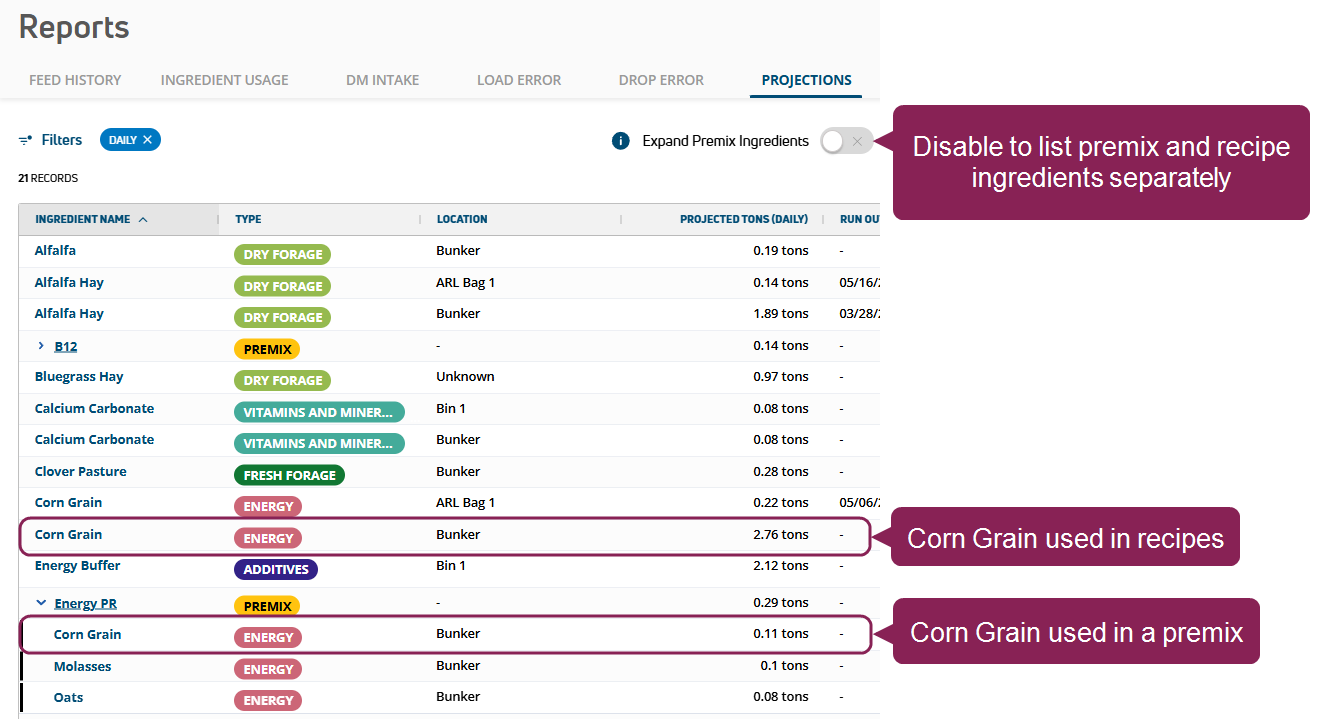
- When enabled, ingredients are grouped together whether they are used in a premix or a recipe. Each ingredient has a single projected total, and ingredients used in premixes are marked by an asterisk (*).
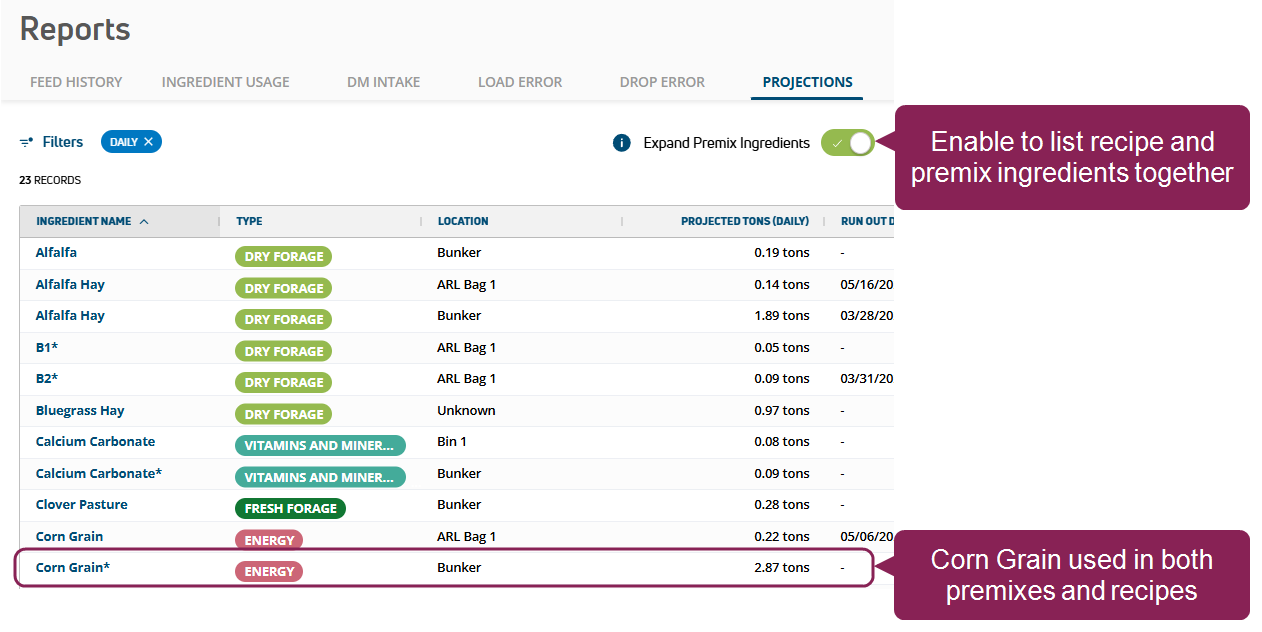
- The Relatório de Uso de Ingredientes now lists whether ingredients are used in premixes or in regular feedings, so you can fully understand your actual ingredient costs and better forecast your herd's feeding needs.
Bug Fixes
- Data sync: The app now refreshes and syncs data as expected.
- Incorrect drop amounts: Improved how the app handles incomplete feedings to avoid showing a drop amount of 0 (zero).
- App opening: Resolved an issue that caused the app to stall on the opening screen and fail to open.
Bug Fixes
- Decimal value fix: Improved metric and imperial decimal handling.
- More incomplete load improvements: Further optimized the system to prevent incomplete loads.
Enhancements & Bug Fixes
WEB ONLY Reports now show the cost of errors. The Load Error and Drop Error reports now include an Error Cost column, which shows the price incurred by exceeding the set loading or dropping amount. Open either report in Table View to keep track of all error costs, so you can better identify and prevent expensive mistakes in the future.

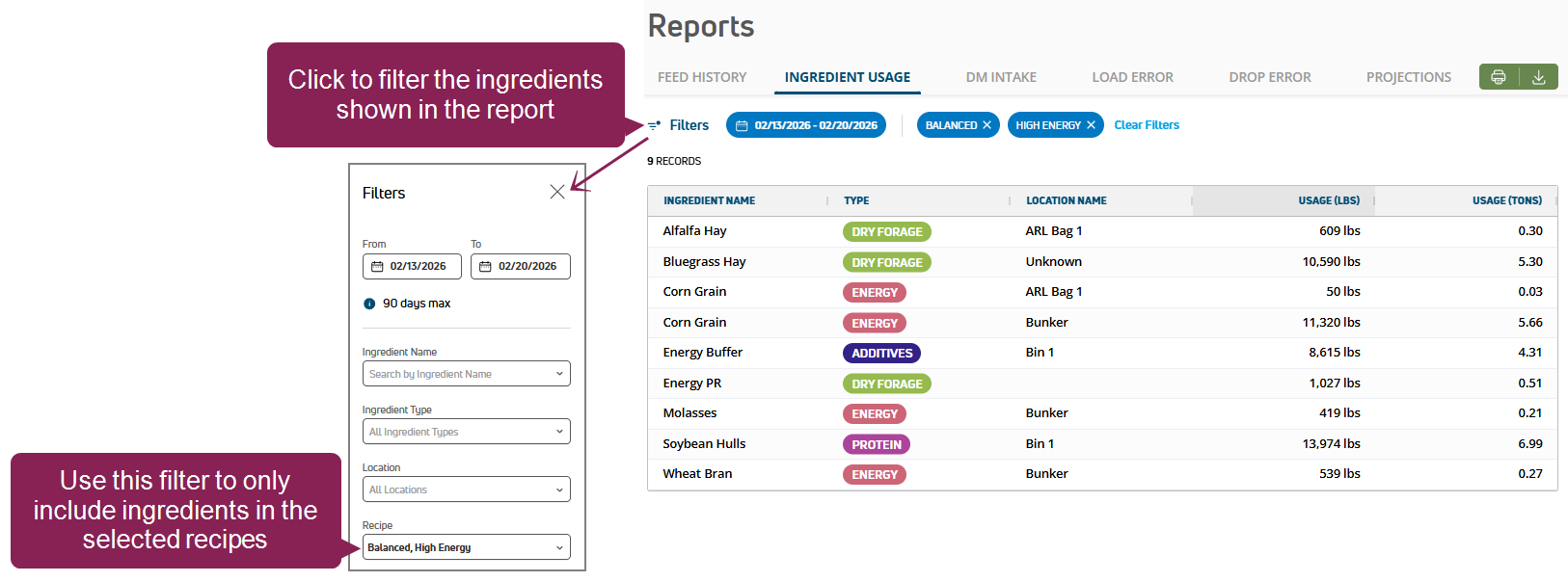
WEB ONLY New recipe filter for the Ingredient Usage report. You can now filter the report to only list ingredients from the selected recipe. Use this filter to guide your feeding decisions. For example, if a recipe uses too much of an ingredient, you might want to distribute a different recipe or restock the ingredient more often.
- Weighback fix: Fixed the Weighback process so the app stays open when adding ingredients.
- Scale sync fix: Improved the app logic so the tablet weight and scale weight sync during drops.
- Incomplete loads prevention: Optimized the system to reduce the likelihood of incomplete loads.
- Ingredient location fix: Improved how the app displays and updates ingredient data if ingredients are stored in multiple locations. If you are still not seeing ingredient data in a known location, manually refresh the app or update the recipe ingredient in the mobile app. If the old location is still visible, set the new location and the correct DM/AF, if needed.
Bug Fixes
- Drop fixes: Improved how the FeedComp App reads data from Topcon Digi-Star scales, eliminating NaN errors and ensuring that drop sequences are handled correctly in the flow.
- Scale sync fix: Improved how the app manages scale disconnect and reconnection attempts. If the scale connection is lost, the app now clearly shows a “Disconnected” status and attempts to reconnect more quickly.
Enhancements
MOBILE ONLY Manage pens in offline mode: You can now make pen adjustments when your device is in offline mode, including editing pen details and enabling or disabling pens. When you reconnect your device, your updates will be synced so your data stays accurate and consistent across all devices.
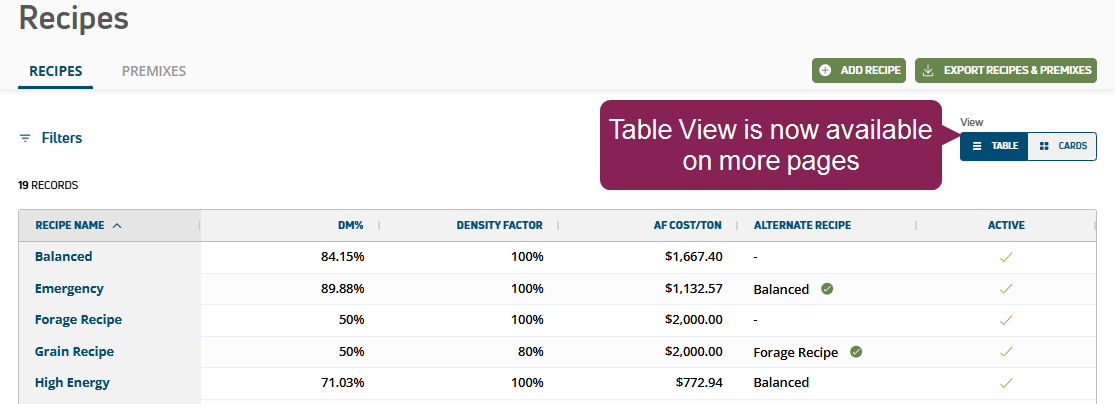
WEB ONLY Added Table view to more pages: Switch to Table view in the upper right corner to easily review Inventory, Recipes, Reports, and more.
Bug Fixes
Scale/weight data fix: Updated the app to improve how weight data is processed, ensuring more consistent and accurate readings from the scale.
Enhancements
NEW FEATURE FeedComp and WeighComp now sync data automatically! Our powerful feed and inventory tracking solutions now share data whenever the FeedComp app is connected, keeping your records accurate and consistent across both apps. Whether you log a new feed shipment in WeighComp or update an ingredient in FeedComp, your inventory stays updated without any extra steps. Note that FeedWatch users with an existing WeighComp integration will be able to convert to FeedComp in a future release.
Bug Fixes
- Duplicated drops: Fixed an issue where drop data was being duplicated in the system and causing inflated dry matter intake and feed costs in reports, including the Relatório de Renda sobre Custo de AlimentaçãoIncome Over Feed Cost Report.
- Batch Feedings cost fix: Corrected cost calculations for Batch Feedings to improve the accuracy of the Relatório de Renda sobre Custo de RaçãoIncome Over Feed Cost Report.
- Ingredient Usage fix: Updated the Relatório de uso de ingredientesIngredient Usage Report to display correct usage values.
Enhancements & Bug Fixes
ENHANCEMENTFeedComp automatically configures Scale-Tec POINT scale display settings: When you connect to a Scale-Tec POINT scale, the app now automatically checks your display settings and corrects them if needed. To learn more about configuring and connecting scales to the app, see EscalasScales.
- Stay logged in after force close: If the FeedComp App closes unexpectedly, you'll stay logged into your account so you can quickly get back to work.
View Versões anteriores - 2025.